


See the trend across all your apps — and put your money where it grows
A batch of new things this month: Business Overview has charts. Win Back Refunds comes to Google Play, A/B tests without Placements, smarter roll-outs, and a trial canceled metric, the one you've been asking for.
A batch of new things this month — all live on Apphud 2.0. The big one: Business Overview has charts. Plus Win Back Refunds comes to Google Play; you can skip Placements and move to 2.0 and run A/B tests; smarter roll-outs; and a trial canceled metric, the one you've been asking for.
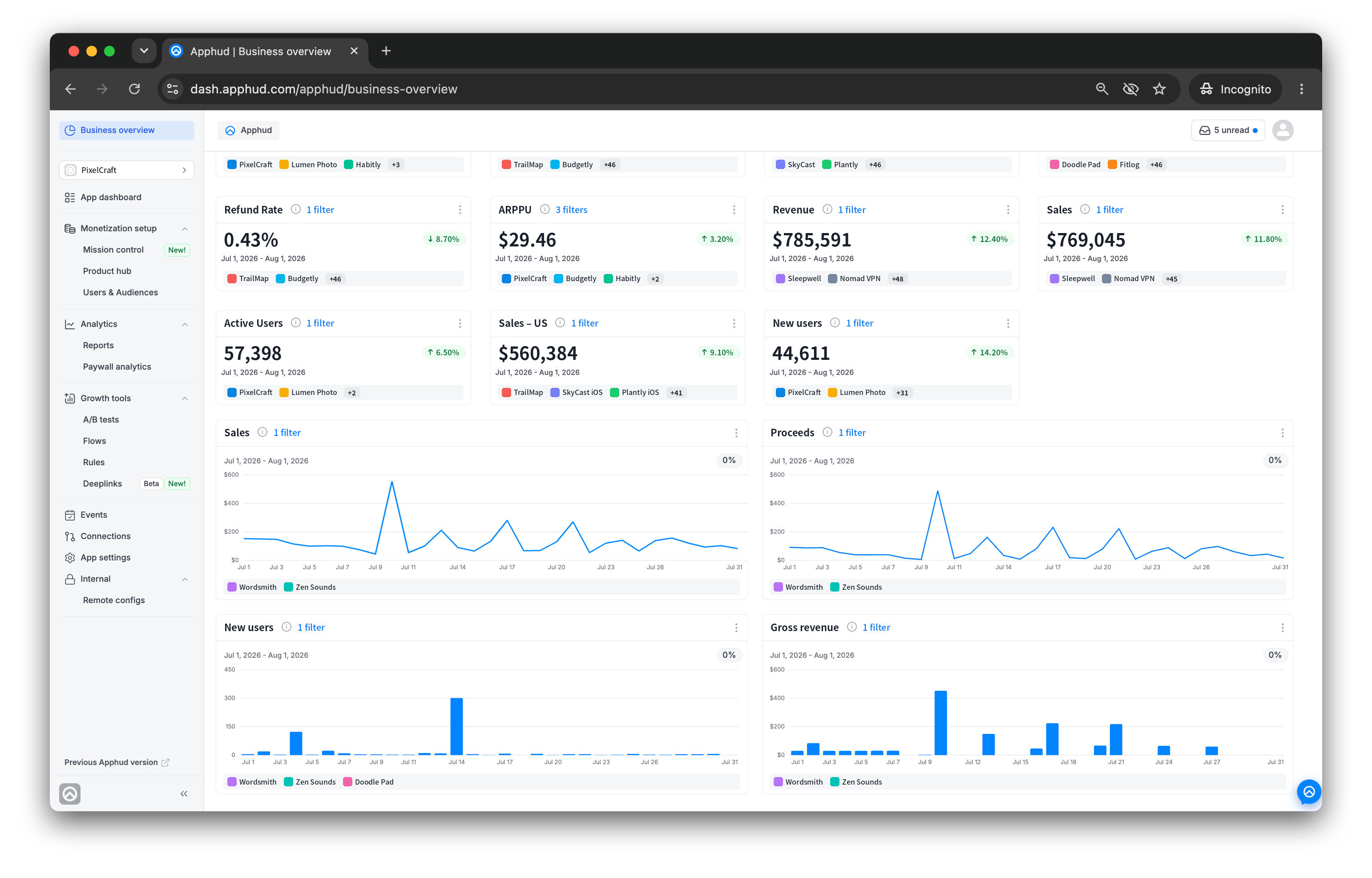
Your Business Overview now has charts. Every Overview widget can be displayed as a number, a line chart, or a bar chart — pick per widget. A number tells you where you landed; a chart tells you how you got there, and whether the dip started three days ago or this morning. Now-type widgets (MRR, ARR, active subscriptions) stay as live numbers, since they're current state rather than a series. Number and chart widgets sit in two groups — numbers on top, charts below — and you can reorder each group by drag-and-drop.
Each chart follows its own default period (Today, Yesterday, Last 7 days, This month, Last month, or Last 3 months), or switch the whole Overview section to a single global range from the date picker — Per widget is the default, so different widgets on one dashboard can answer different questions.
Set the scope once. Every widget follows. Add Platform and Apps filters at the dashboard level — new widgets inherit them, existing ones prefill. Flip on "All current and future apps" and an "all apps" dashboard stays current on its own: no edits the day you ship a new app. When a dashboard covers specific apps, individual widgets can still narrow down to a subset — handy for a side-by-side view, one widget per app.
The triple widget is back. The one you've missed since migrating to 2.0: Active Paid Subscriptions, Active Trials, Active Intro Offers, and Active Promo Offers — each showing the active total plus the split between auto-renewing and non-renewing subscriptions, at a glance.
Two things worth knowing if you're going deeper: every dashboard and widget has a stable ID for API access, so you can pull Business Overview data into your own BI tools, Slack reports, or CSV exports through the Analytics API. And the whole thing is available in the Apphud iOS app, including home-screen widgets built from any dashboard widget.
Win Back Refunds now fights Google Play chargebacks
Apple has had a refund-dispute channel for years. Google never did — until now. In 2026, Google changed how Play chargebacks work: for purchases made from August 3 onward, developers share the financial cost of chargebacks that Google used to absorb. At the same time, Google opened something new — a 24-hour window to tell it whether a disputed purchase should be refunded, and to show what actually happened inside the app after the purchase.
That's the same principle Win Back Refunds has been running on iOS: a store is deciding whether money goes back, and the developer has usage evidence the payment system doesn't. Now the add-on covers Google Play too.
How it works. When Google flags a chargeback for developer review, Apphud responds on your behalf within the window — with a preference and real consumption data — so the 24-hour clock doesn't run out unanswered at 3 a.m. Set your default once: Auto (Apphud weighs actual sessions since the purchase and picks the answer), Always decline, Always approve, or No preference. Every future review follows it without you touching a thing. Outcomes show up in the Refund Requests Report — declined requests are marked Managed by Apphud and roll into your Won Back Value.
One scope note. This covers chargebacks — disputes the customer opened through their bank. Self-service refunds requested directly in the Play Store aren't exposed to developers as contestable, so they're not part of this flow. But on the segment where you previously had zero say, that's a real change.
It's off until you turn it on — deliberately. Even if Win Back Refunds is already running for iOS, Android is a separate toggle on its own tab: you're authorizing Apphud to answer Google for you. You'll need Real-Time Developer Notifications configured in your Play Console first (that's step zero). Go to Growth tools → Rules → Win back refund requests → Android and enable Automatically send consumption information to Google. Auto is already the default preference.
Does it pay? We have a benchmark from iOS: drawing app ArtWorkout was averaging a 6.5% refund rate before Win Back Refunds; after enabling it, the average fell to 3%, while the decline rate on refund requests rose from 13% to 42%. Across customers on iOS, Apphud has seen monthly refund losses reduced by up to 70%. That's an iOS result, not an Android promise — Google's review flow is new, and Android needs to build its own track record. But the window is open now.
Reports
New on the Trial Conversion chart: Canceled after conversion. See how many trials cancel before the first renewal after conversion. Analyse it by Media Source, Campaign, Country, etc and prevent churn with our Growth tools described in our previous article, so the drop-off right after conversion stops.
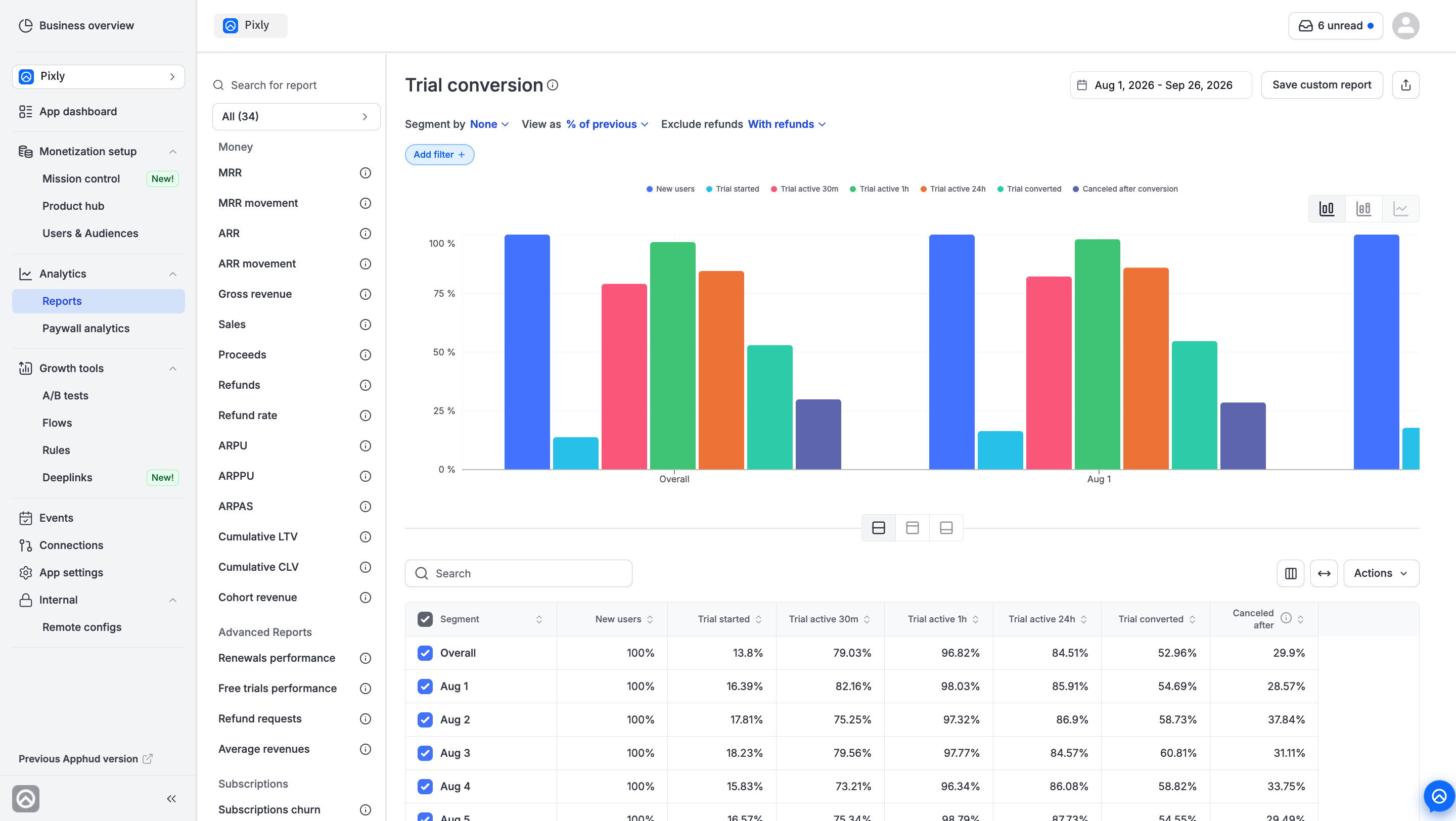 Catch cancelation and prevent churn
Targeting & Experiments
Smarter roll-outs. Rolling out a winning variation now gives you a choice per placement. Update paywall content overwrites the placement's current paywall in place, keeping the same paywall ID — note that if that paywall is also used by other placements, they get the new content too. Create new paywall spins up a separate one. And if the winning variation's paywall is identical to the original — say you picked Use existing paywall and changed nothing — roll-out reuses the original instead of creating a duplicate copy. As before, roll-out is available on Completed tests only, and it's one-way: pick the winner deliberately.
Other improvements
- App Dashboard filters — Platform, Store Country, and Country by IP are back, by request, matching the old cabinet.
- Period comparisons on dashboards now calculate percentages with proper boundaries.
- Billing Grace / Retry widgets no longer show a period comparison — those metrics don't keep historical snapshots, so the comparison was misleading.
- Switching apps keeps your current report open instead of jumping to MRR.
- A/B tests with no artifacts now warn you before saving: with nothing to compare between variations, the test reports only Users and Overall Proceeds — no per-variation views or purchases. You can save anyway when you're testing App remote config on its own; if the config targets specific placements, add those to get comparable metrics.
- Offline fallback now carries Remote Config and Placements, not just paywalls.
SDK updates
- iOS SDK 4.6.0 — purchases, restores, and offers now run fully on StoreKit 2. No changes required in your integration; older StoreKit 1 APIs keep working and are marked as deprecated.
- Android SDK 3.5.0 — migrated to Google Play Billing Library 9.1.0.
Not on Apphud 2.0 yet?
This — and a lot more — is waiting in the new cabinet: deferred Deeplinks, timezone-aware Rules, the Apphud MCP, and the Analytics API. Your account is already set up — nothing to rebuild.
Thanks for building with us — more coming soon!
Renat & the Apphud team
