


Say the Word, Apphud now Does It: AI That Acts, Permissions That Fit, Rules on Every Platform
Here's what's new in Apphud — an AI assistant that finally acts, not just answers; permissions precise enough to trust with an agency; and Rules and Deeplinks landing on Android and Flutter.
This update moves the assistant beyond a Q&A box and into the work, and it also brings the rest of the platform up to speed—tighter access control, wider platform coverage, and more. If you've only glanced at Apphud since the last release, this is the one worth opening the dashboard for.
Your AI assistant can act now, not just answer
Connect Apphud to Claude — Desktop, web, or Code — or to Cursor, and it stops being another tab you check and starts being a place you can just ask: "What's my MRR this quarter?" "Which paywall converts best on iOS?" "Which A/B variation won, and is it significant?" Answers come straight from your live data — no export, no copy-paste.
And it doesn't stop at answers. Tell it to spin up a paywall, adjust an A/B test, trigger a new pushes automation rule, or wire up an entire custom integration, and it will not only guide you through the setup, but fill in the request itself — ready-made templates for destinations like AppsFlyer, Binom, Meta Conversions API, GA4/Firebase, or Google Data Manager, so nobody's hand-writing a payload. Every new connection starts inactive, so you preview and test-deliver before it goes live.
The setup is deliberately light — nothing to install, no API key to generate. It authenticates as you, so it's bounded by whatever your account can already see and do. Every session lands in Active sessions on your dashboard, one click from revoked, and if you'd rather it only look, read-only access keeps it that way.
Apphud MCP is available on Expert+.
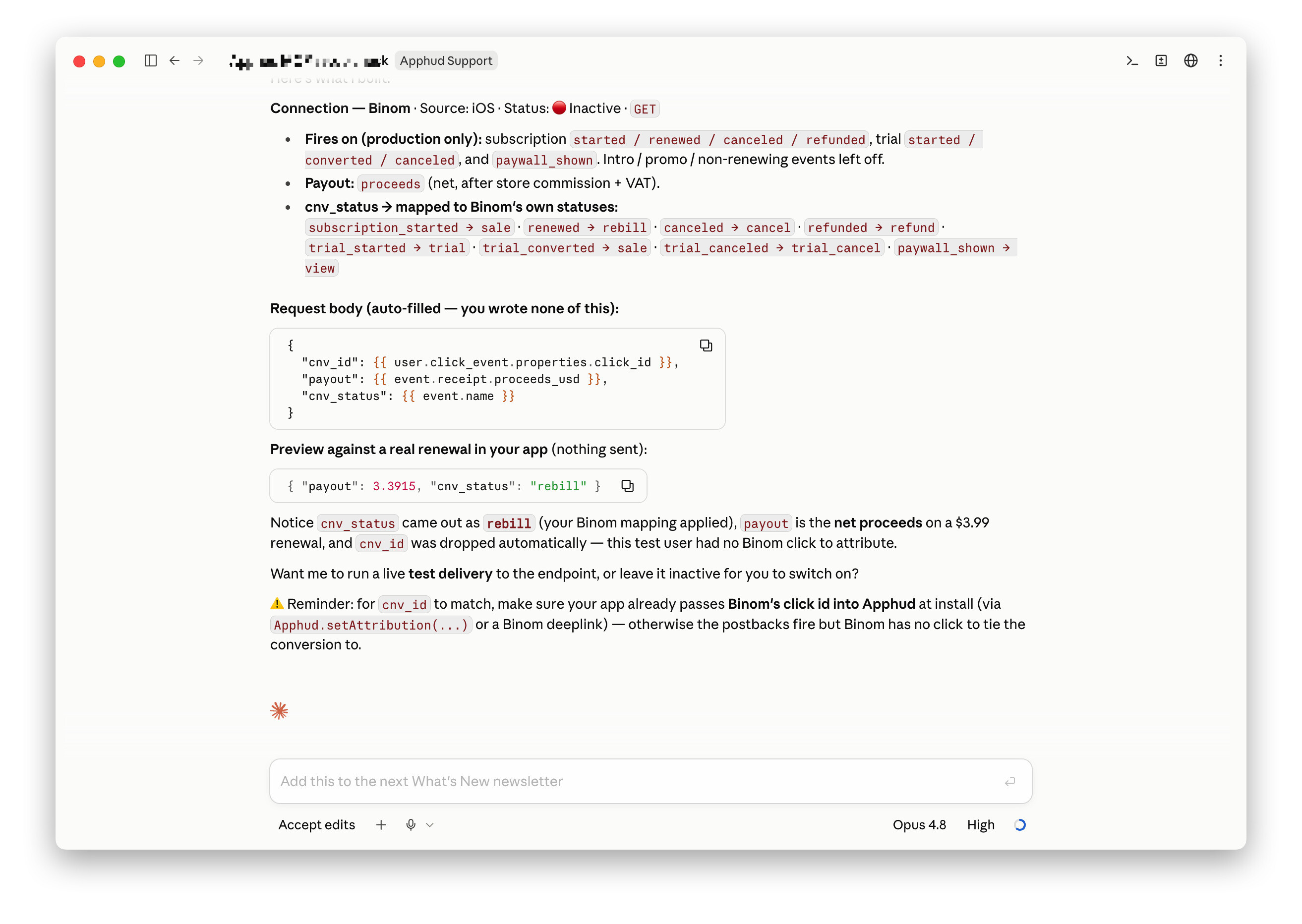 Apphud MCP - Setting up a custom Binom integration
→ Connect your assistant and ask it about last month's cohorts. More on Apphud MCP
Permissions get their own matrix
The per-app access you already have now goes down to the feature. Each app breaks into 10 areas — Monetization setup, Analytics, A/B tests, Flows, Rules, Deeplinks, Events, Connections, App settings, Data export — each set independently to Full access, Read only, or No access.
Managing that at scale is what the new matrix view is for: open a member's profile and see everything they can touch in one grid, apps as rows, features as columns. Edit a single cell inline for a quick fix, or open the bulk dialog to push the same change across every app they're in at once.
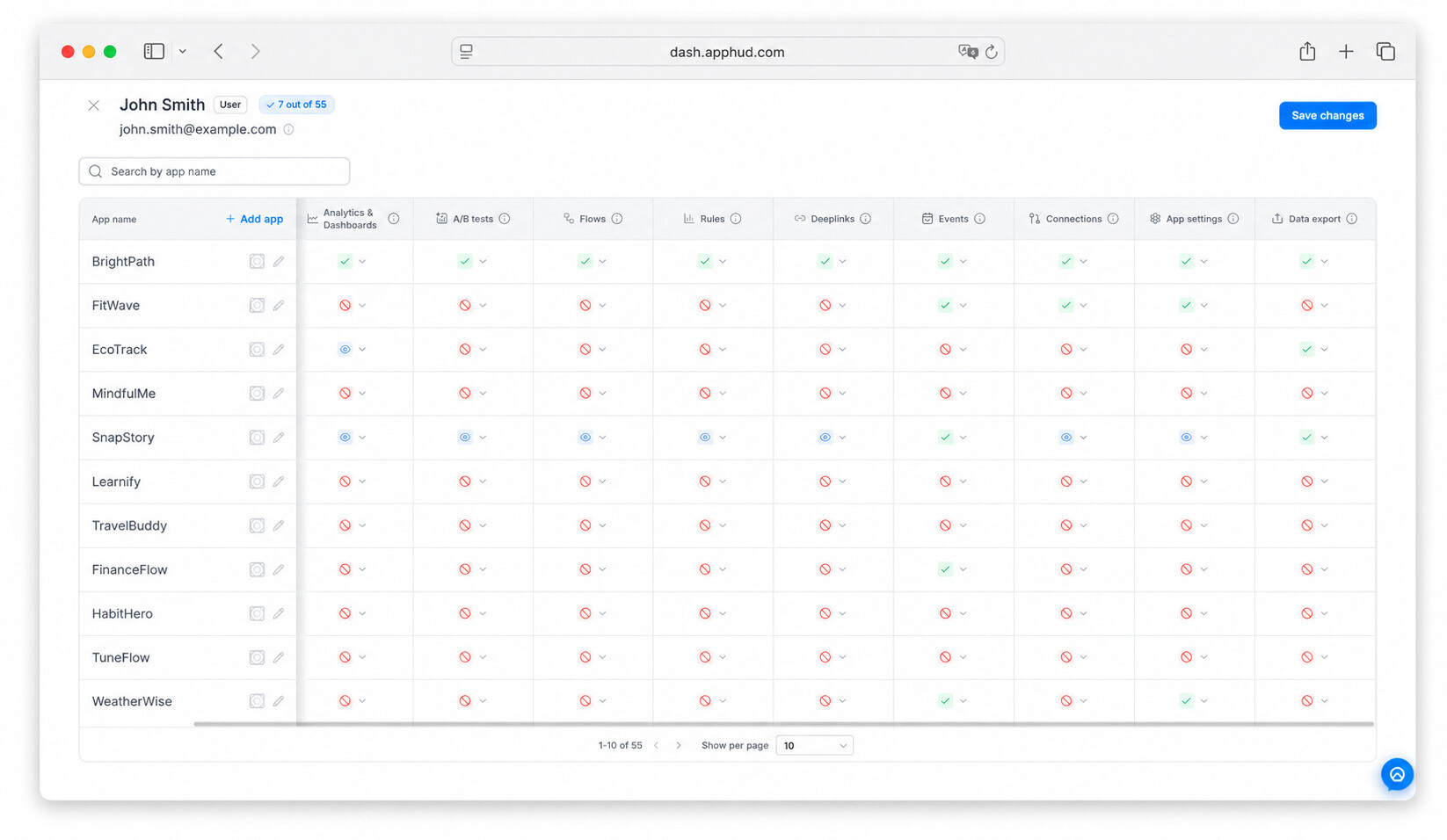 User Permissions matrix at Apphud
→ Open a teammate's profile and see the full grid. More on Permissions
Rules and deeplinks reach Android and Flutter
Win-back campaigns, promo offers, screens timed to the moment, context-preserving links from an ad or influencer post straight into the app — automation that's lived on iOS for a while just got a lot more reach.
Android (SDK 3.4.0+) and Flutter (SDK 3.3.0+) now runs Rules in full. Flutter (SDK 3.3.0+) gets both Rules and deferred deep links for the first time, working across iOS and Android alike.
The template set got an update too: the Promo Offer Screens library adds ready-made screens for a free-trial extension, a one-time gift, a personal discount, and more — pick one, customize it, and it's live. Every screen reports on itself as well: presentation counts and response totals land right in the rule's Analytics tab, so a cancellation survey tells you not just that it ran, but how people actually answered.
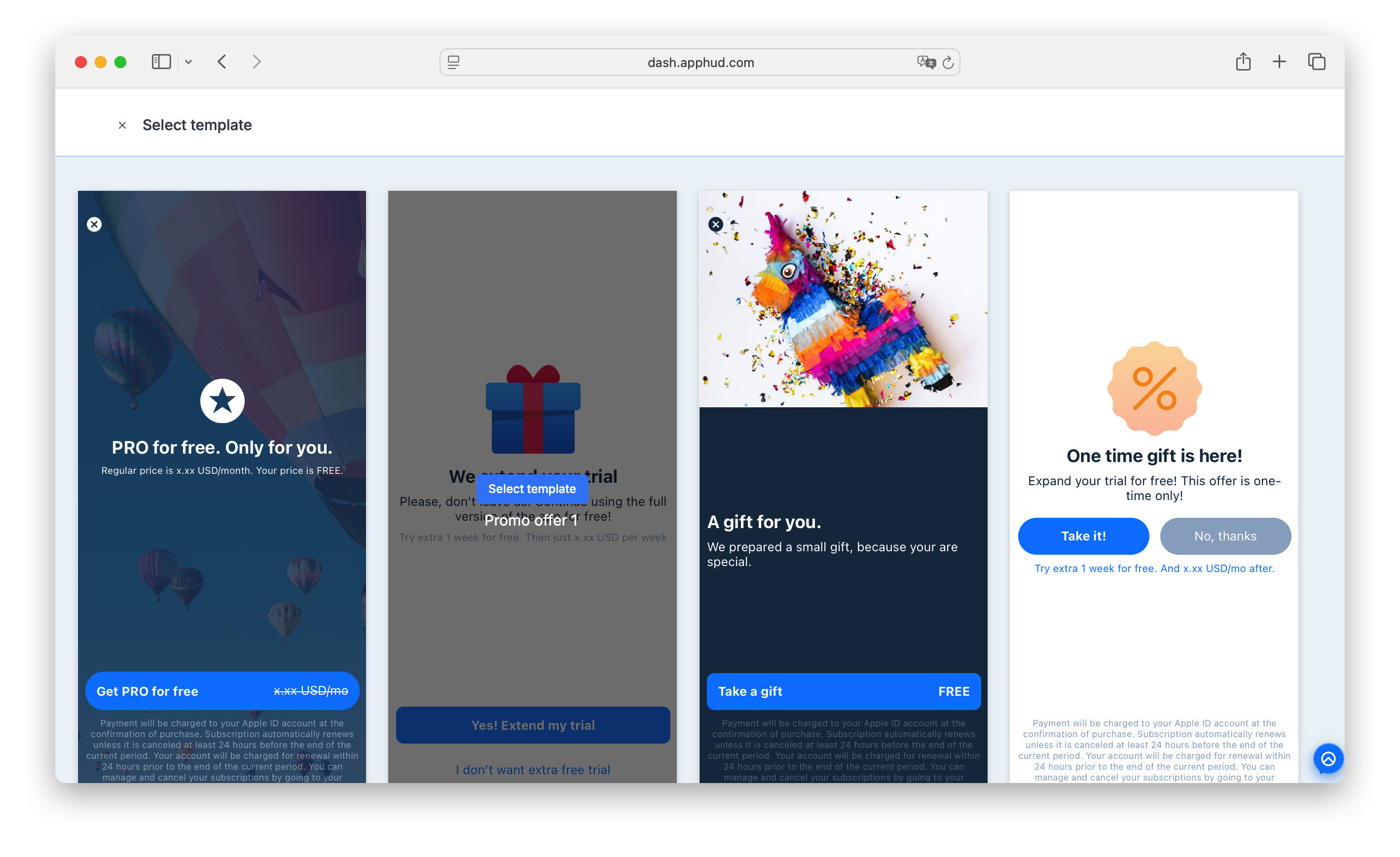 In-built screens templates at Apphud
→ Update your Android or Flutter SDK and turn on a Rule you've only run on iOS. More on Rules
Your data, in your own pipeline
Not every team wants a dashboard — some want the numbers flowing straight into a BI tool or the internal report everyone already watches. The Analytics API does exactly that: MRR, conversions, cohorts, queried directly, either scoped to one app or across your whole organization.
An app-level S2S key, generated in App settings → Authentication Center, covers the first case; an organization-level key from Organization settings covers the second — a separate key from your per-store connections, purpose-built for pulling analytics data out. It's available on the Expert plan and higher; the docs lay out the data model, and Swagger gives you field-level schemas with live request testing while you build.
→ Generate a key and pull last quarter's MRR into your own report. Analytics API docs · Swagger
Everything else worth knowing
Sign-in & security
- Passkeys — add Face ID, Touch ID, Windows Hello, or a hardware key to your login instead of a password, from Account settings → Security → Passkeys.
- Optional log-off from other open sessions on password change.
Revenue & growth data
- Google Play one-time purchases — non-consumable purchases now tracked via Google's real-time developer notifications, so that revenue shows up in Apphud and can trigger Rules just like subscriptions do.
- Predicted LTV's forecast window is now longer — 120 days out, for cohorts and A/B tests alike.
Integrations & data hygiene
- A new
sha256filter in Connection Builder lets you hash emails and identifiers before sending them to Meta CAPI, Google Customer Match, or any destination that requires it. - Anonymous events can now reach supported integrations, once enabled in that integration's settings.
- S2S Webhooks attribution payloads now include Branch data.
- Firebase gained a longer list of built-in event names (custom ones now sort to the end), moved authentication to Google's Data Manager API in place of the deprecated Measurement Protocol, and the
trial_activepayload now includes zero-value revenue.
All of it's live on Apphud 2.0 today. If you're already there, just open the dashboard — ask the assistant your first real question, hand an agency read-only access instead of the keys, or flip Rules on for the Android users you've been automating around for a year. Still on the legacy dashboard? This is exactly what migrating unlocks — reach out to your account manager or support to get moved over.
