



Apple's had this for years. Google never did — until now.
… And the slice Google finally built it for is the one where losing costs you more than the refund itself.
In 2026, Google changed how Google Play chargebacks work for developers. For purchases made from August 3 onward, developers began sharing the financial cost of chargebacks that Google had previously absorbed.
At the same time, Google gave developers something they didn't have before: a say in certain chargeback disputes.
The new Review Refund API gives you 24 hours to tell Google whether you think a disputed purchase should be refunded — and, much more importantly, to show Google what actually happened after the purchase.
Those are two sides of the same change. More financial responsibility, but also a new opportunity to defend legitimate revenue.
Two kinds of refund, and one of them stays invisible
An ordinary Google Play refund and a chargeback can both end with money leaving your account. They don't get there the same way.
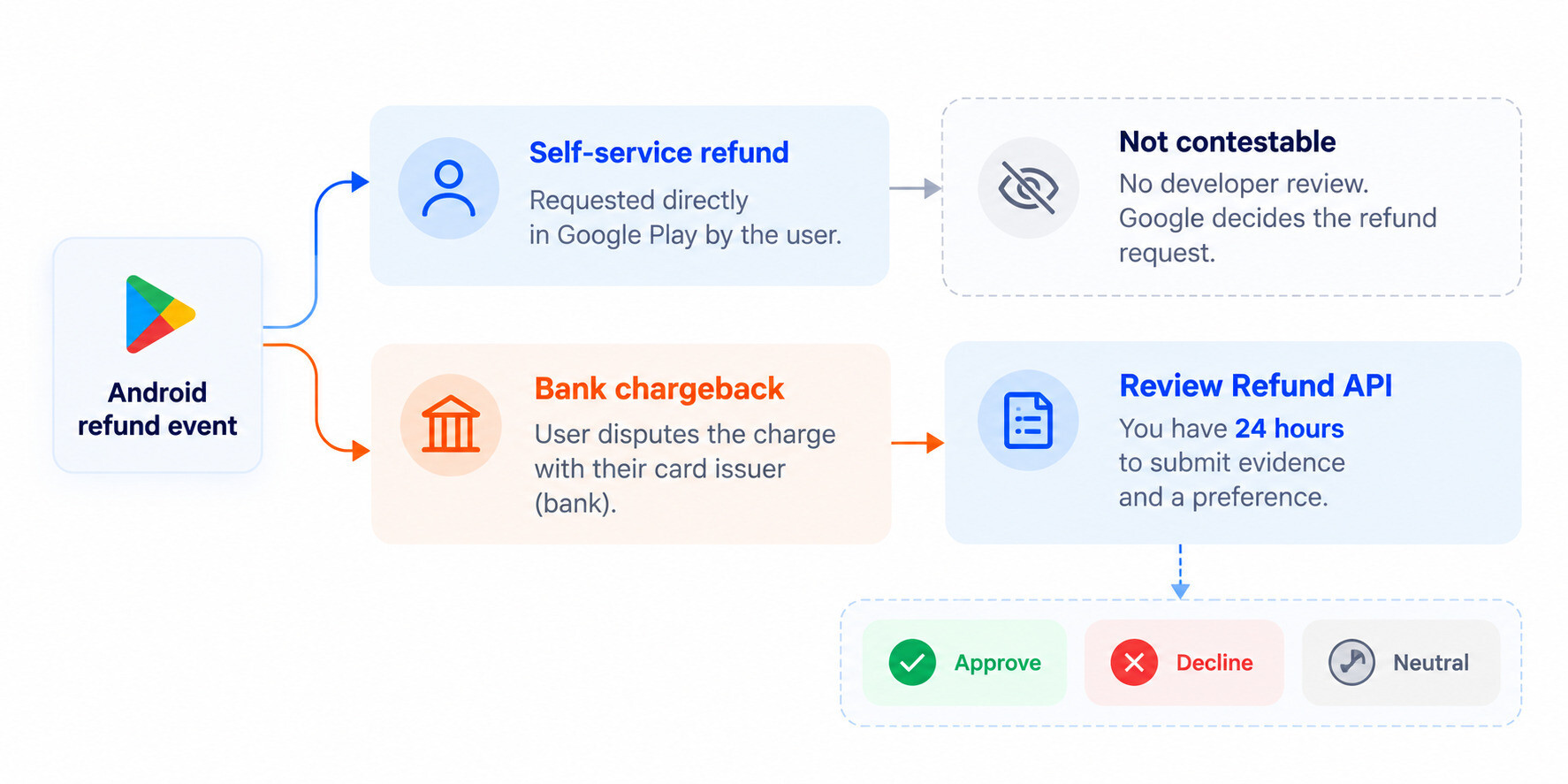 The two paths of Android refunds
A self-service refund is the user asking Google directly for their money back. Google handles the request through its normal refund process. There's no Review Refund API request waiting for you, no 24-hour developer response window, and no opportunity to attach evidence before Google makes that decision.
A chargeback starts somewhere else: with the user's bank or payment provider. The user disputes the payment itself.
And since 2026, some of those chargebacks can enter a new developer-review flow.
That distinction matters: not every chargeback necessarily reaches you for review. Google sends a PendingRefundReviewNotificationCHARGEBACK
So this isn't a new way to contest every Google Play refund. It's a way to participate in a specific, pricier subset of cases.
What losing one actually costs
A $2 coin pack gets disputed. The financial institution's chargeback fee can be larger than the sale ever was. You don't just lose the revenue from the transaction; you can go net negative on a purchase that already happened.
Scale that up: a $40 subscription charge gets disputed. The developer is responsible for the purchase price less Google's service fee, while Google continues to cover its service-fee portion. An associated chargeback fee from the financial institution can land on top.
So the economics are different from an ordinary refund:
refund loss = lost transaction revenue
chargeback loss = lost transaction revenue + applicable financial-institution chargeback costs
And the smaller the original transaction, the stranger that math can get.
A fraud analyst recently modelled exactly this problem in r/androiddev. In his example, a $5 IAP leaves the developer with $3.50 after a hypothetical 30% Play fee. Add an illustrative $25 chargeback fee, and losing the dispute turns a $5 sale into a $28.50 loss.
Google hasn't published a universal chargeback fee; the $25 is an industry-style example, not a Google rate. But the shape of the risk holds: for low-priced IAPs, a lost chargeback can cost several times what the purchase earned.
This isn't a corner case
Android apps earned $49.2B on Google Play in 2025 — $19.2B of that from in-app purchases. Google itself says it prevented $3.4B in fraud and abuse that same year.
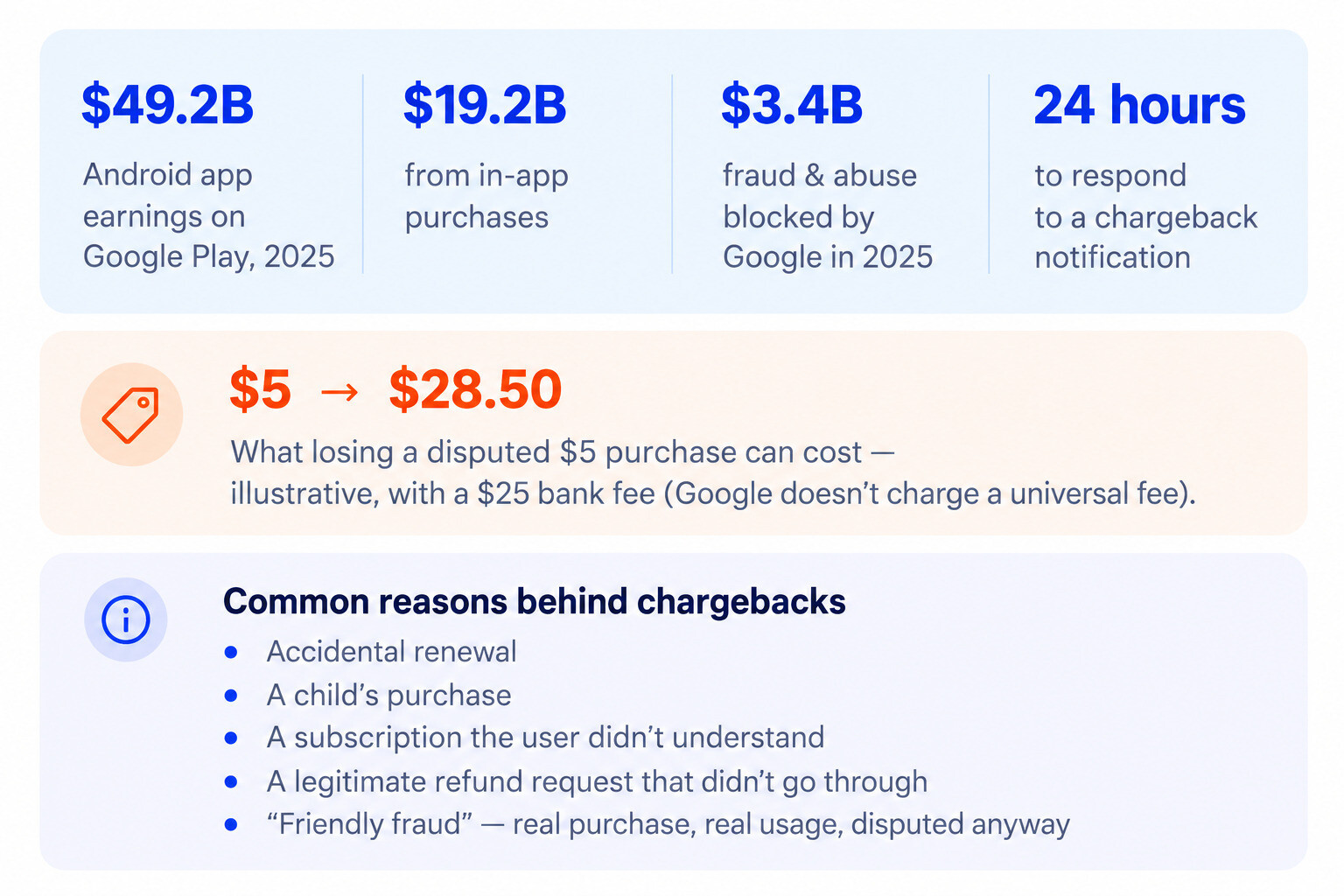 Chargebacks in context
And chargebacks aren't synonymous with stolen cards.
Some are "friendly fraud": a real customer made the purchase, received the product, often even used it, and later disputes the transaction anyway. Others start with something much less malicious — an accidental renewal, a child making a purchase, a subscription the customer says they didn't understand, or simply a refund request that went nowhere.
You can see that path playing out publicly.
In one 2026 r/googleplay case, a user said they downloaded a screen-casting app while staying at a hotel, couldn't get it to work, and forgot about it. Weeks later, they discovered that Google Play had charged them for six weekly subscription renewals. Google rejected the refund requests and told them to contact the developer.
That's an anecdote, not a statistic, but it shows that not every chargeback begins as one. Some start as a customer-service problem.
Once the customer goes to their bank, a normal refund becomes a payment dispute with its own fee attached. The cheapest chargeback is the one that never happens. For the ones that do, Google has finally given developers a way to respond.
We built the same defense that already works on iOS
Win Back Refunds has done this on iOS for a while: when Apple asks about a refund request, Apphud responds with real usage and consumption data before Apple decides.
Google's trigger is different, since only chargebacks that require review qualify, but the principle is the same. The developer knows what happened inside the app, and now there's a channel to tell the store. We added Google Play support so you don't have to build and watch that channel yourself.
Side note: if the Win Back Refunds feature isn’t yet activated for your Apphud account at all, you'll need to do that first.
What actually happens under the hood
Here's how the exchange works:
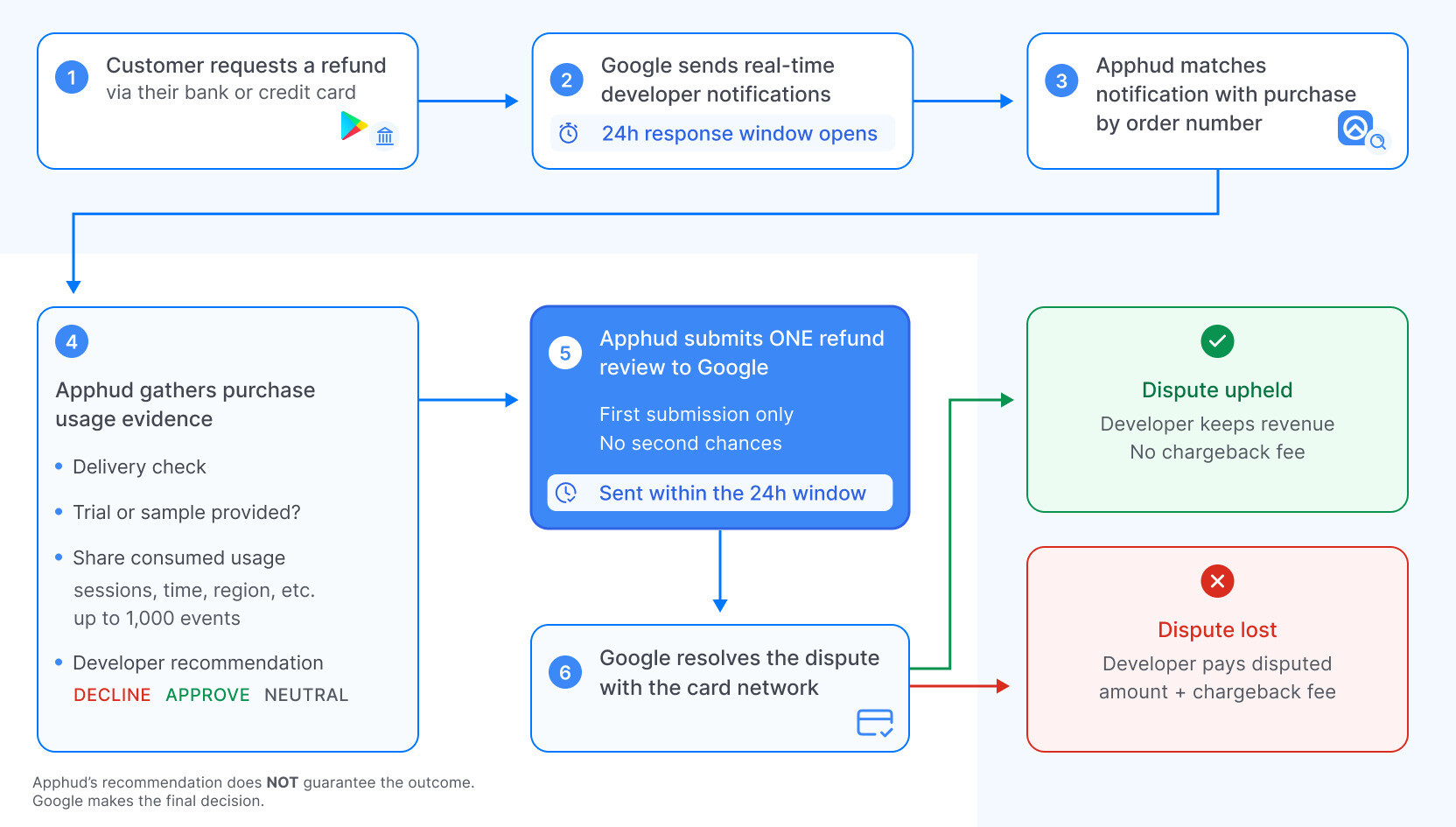 How Google chargebacks work at Apphud
Google currently supports three native preferences:
APPROVE — you recommend granting the refund.
DECLINE — you recommend rejecting it.
NEUTRAL — you don't recommend either outcome.
Win Back Refunds also has Auto, which evaluates the information available to Apphud and chooses the response automatically.
One detail from Google's documentation is worth knowing before you ever try to implement this manually: Google records the first API call made in response to the notification.
Send another one and the API can still return OK
There is no second draft.
That's a surprisingly important implementation detail when the response has a 24-hour deadline and notifications can arrive at any time of day.
And an OK
Google is equally explicit about the evidence itself: consumption information helps explain what happened with the purchase; it doesn't guarantee that the chargeback will be rejected.
Your job is to build the strongest factual record you can. The final decision isn't yours.
Why the "usage evidence" detail is the whole ballgame
This is where the Review Refund API gets much more interesting than a simple Approve / Decline button.
Google could have built an API that only asked:
- Developer, should we refund this?
Instead, it built one that can also ask, in effect:
- Developer, what happened?
A preference alone can be submitted. But Google's public evidence schema goes considerably further.
The Review Refund API can accept signals such as a cumulative consumption percentage, IP address and coarse geographic location, as well as structured information about usage associated with the purchase.
Imagine two users disputing the same $40 purchase.
For the first one, your response is essentially:
- DECLINE. We believe this purchase was legitimate.
For the second, the case could look more like:
- DECLINE. The purchase was delivered. The customer subsequently used what they bought, and a substantial portion had already been consumed before the dispute was opened.
Both are Declines. They're not the same case.
Google already knows that the payment happened. What it may not know is what happened inside your product after the payment.
For consumables, this becomes especially obvious. "The virtual currency was delivered" tells you one thing. "The virtual currency was delivered and then mostly spent" tells you much more.
Google's schema also asks whether sample content was provided: a free trial, a sample, or a clear description before purchase. Put together, the story isn't just “the transaction was real.” It's “the customer knew what they were buying, received it, and used it”.
That also means chargeback defense starts long before a chargeback arrives. If the dispute opens today, you can't travel backwards and start collecting yesterday's product usage.
Why having an SDK inside the app changes the response
Because evidence is optional, any system can send Google a bare DECLINE. It just has very little to back it up.
Apphud's SDK is already inside the app, while Apphud is already processing the subscription lifecycle and user activity needed to operate the service.
So when a chargeback review arrives, Win Back Refunds isn't starting from an empty request and a 24-hour countdown. It can evaluate information that existed before the dispute was opened and use relevant context when responding to Google.
The exact signals and decision logic behind that evaluation stay on our side.
For the developer, the important distinction is simpler:
- automation gets the response there within 24 hours.
- existing first-party context gives the response something useful to say.
Here's a simplified example of what Apphud submits to Google's refund review API for a Decline recommendation backed by real usage — exact fields and content depend on actual usage and your selected preference:
{
  "pendingRefundToken": "AbCdEf123...",
  "sampleContentProvided": true,
  "refundPreference": "DECLINE",
  "consumptionPercentageMilliunits": 100000,
  "consumptionUsageEvents": [
    {
      "obfuscatedAccountId": "9f8a...",
      "consumptionTime": "2026-09-15T09:12:00Z",
      "consumptionItemDescription": "android session; duration: 12 minutes 04 seconds",
      "location": { "regionCode": "US" }
    },
    {
      "obfuscatedAccountId": "9f8a...",
      "consumptionTime": "2026-09-20T18:47:00Z",
      "consumptionItemDescription": "android session; duration: 34 minutes 18 seconds"
    }
  ]
}Building it yourself is possible — but there are traps
None of this is a closed Google system. You can implement it yourself.
At minimum, you need Real-Time Developer Notifications, Pub/Sub infrastructure, an endpoint that reliably receives the new notification, logic to associate its orderIdorders.reviewrefund
Then you need to keep it running: retries, monitoring, duplicate/replayed events, authentication, silent delivery failures and evidence storage.
One easy mistake is confusing two similarly named Google APIs.
orders.refund
orders.reviewrefund
Building the plumbing is maybe two weeks of work for a team that's done webhook infrastructure before. The ongoing part — making sure it is still working correctly when a chargeback arrives at 3:17 a.m. six months later — tends to be where year two gets more expensive than year one.
Finally, an OK
The useful way to think about chargeback defense
Chargeback defense has three stages.
Before the dispute: clear terms, a sane refund path, and retained usage history.
During it: the right preference and evidence, within 24 hours, once.
After it: tracking outcomes and the revenue actually protected. The API only covers the middle.
Don't just fight chargebacks. Find out where they're coming from.
Winning a chargeback protects one transaction. Finding out why you're getting those chargebacks in the first place can protect considerably more.
Apphud's Refund Requests Report isn't just a ledger of cases. You can slice and filter the data to look for patterns behind them.
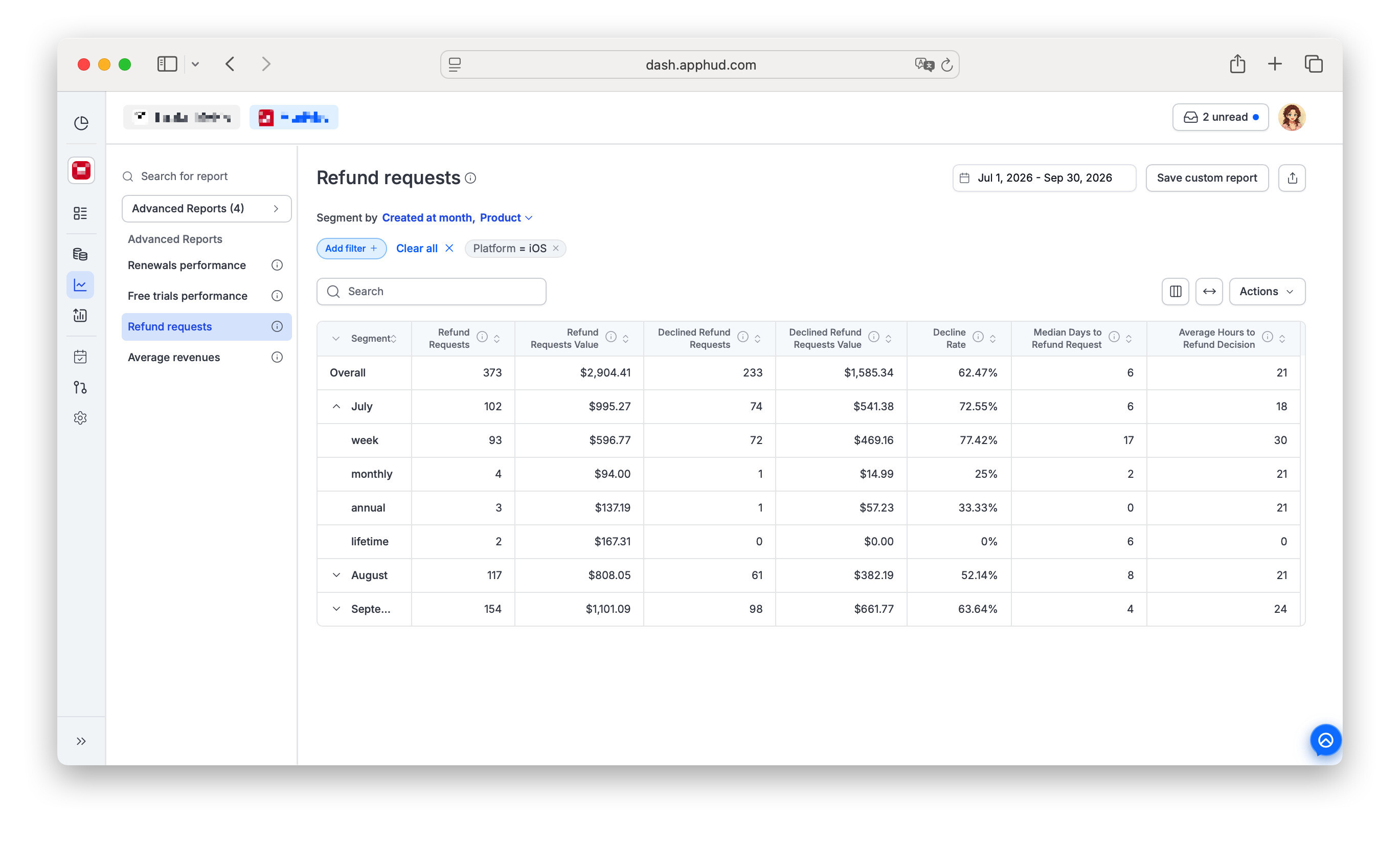 Refund Requests report at Apphud
- Is one subscription product generating a disproportionate share of refund requests?
- Are they concentrated in a particular country or audience?
- Did they spike after a pricing or promotional change?
- Is one acquisition source or campaign bringing in users who convert normally — but later request refunds far more often than everyone else?
That last one is particularly easy to miss. A campaign can look healthy when you measure installs, conversions and initial revenue, while the users it acquired are disproportionately represented in refunds later. What looked like good acquisition may turn out to be low-quality — or potentially abusive — traffic.
Refund behavior becomes another signal for separating revenue from good revenue.
A standalone responder can't see that. Knowing a $25 purchase was disputed is useful; knowing the buyer came from the same campaign as a cluster of other disputes is something you can act on.
Our refund management use case goes deeper into how refund data can be segmented to uncover these patterns.
The same report tracks the number and value of refund requests, pending and declined requests, and the decline rate. You can segment it, save custom reports, or pin the KPIs as widgets.
Counts and dollars matter together. Preventing ten $2 refunds and preventing ten $40 refunds produces the same decline count and a very different business result.
The goal isn't to maximize the decline rate at any cost. It's to understand why customers are asking for their money back, which losses can legitimately be prevented, and where the underlying problem starts.
Does it actually work?
We already have a useful benchmark from iOS.
In one Apphud case study, drawing app ArtWorkout was averaging a 6.5% refund rate before enabling Win Back Refunds. After implementation, its average refund rate fell to 3%, while its refund-request decline rate increased from 13% to 42%.
That's an iOS result, not an Android promise. Google's chargeback review flow is new, so Android needs to build its own track record.
Across customers using Win Back Refunds on the platform where it has been running longest, Apphud has seen monthly refund losses reduced by up to 72%.
What Android developers do have now is something they didn't have before: a 24-hour window in which a qualifying chargeback doesn't have to go unanswered, an API designed to accept evidence about what actually happened around the purchase, and enough reporting context to see not only what you saved, but where the problem came from in the first place.
Turn it on
Go to Growth tools → Rules → Win Back Refunds → Android and enable Automatically send consumption information to Google.
It's a separate toggle, off until you turn it on, even if you already use Win Back Refunds on iOS. That's because you're authorizing Apphud to respond to Google on your behalf. Once enabled, Auto is the default preference.
Two prerequisites: Win Back Refunds must be active on your account, and Apphud must be receiving Real-Time Developer Notifications from your Play Console. After that, there's nothing else to configure.
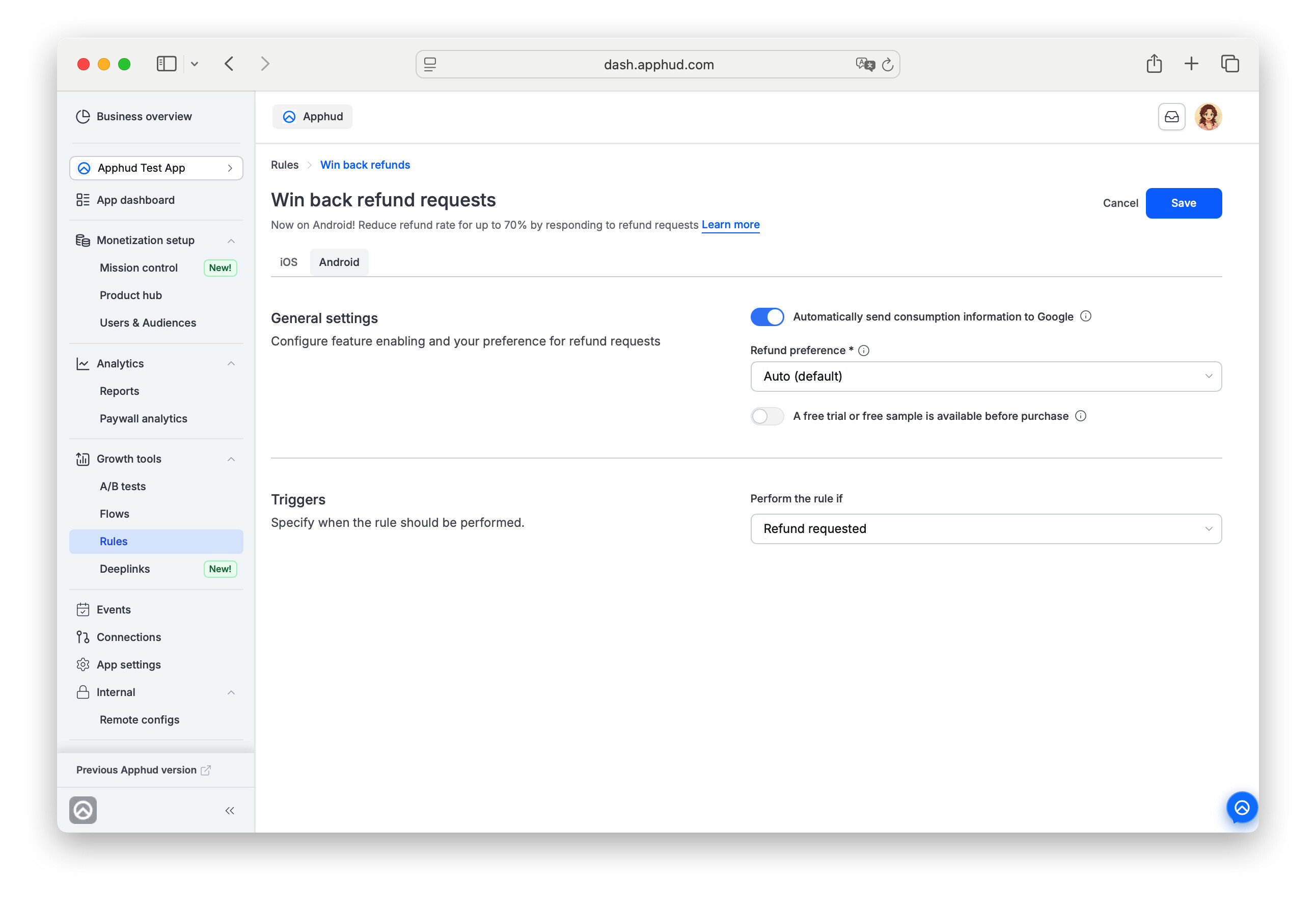 Win Back Refunds settings for Android in Apphud cabinet